


잡지식 FM-10 간략 매뉴얼
2005.04.19 16:25

 |
|
Credit: EeWyn, for preparing the manual in HTML format. Miss Wati, Fiona and Yen for helping the setup work. Miss Rizza, Sales Manager - Shriro Malaysia. Mr Tham, Mr Lim of Foto Edar for lending a manual for reference. Mr Jacko for lending his FM-10 camera and zoom lens for some images in this site. We have some good times together... except no KFC and Pizza for dinner. |

The Nikon FM-10 is a compact and lightweight SLR camera with full open aperture TTL exposure metering. Enjoying good photography becomes far easier with this camera. It just requires releasing the shutter on your focused subject at the setting which the LED displays green. With care and understand the content in this site, you can enjoy taking high quality photography for the years ahead.
Inserting the battery
|
|
1. Turn the battery chamber lid (22) counterclockwise using a coin or something similar. |
2. Two LR44 type alkaline batteries or two SR44 type silver batteries are to used with this camera. | |
3. Place the batteries so that both positive (+) sides are at the bottom of the compartment. | |
4. Turn the battery compartment cover clockwise until it closes firmly. |

Battery Check
|
|
|
| 1. Move the film advance lever (3) to the ready position. 2. Lightly press the shutter release button (2). Now the exposure metering system is switched on. Next, look through the viewfinder. When one of three LED iamps ( O, + or - ) lights, then battery condition is satisfactory. If no lamp lights, the baneries need replacing or have been loaded incorrectly. |
3. Renew both batteries as necessary. 4. When not using of the camera, always return the film advance lever to the original position to prevent accidentally releasing the shutter. |


Caution: Keep batteries away from infants and small children. In case a battery is accidentally swallowed, call a doctor immediately as the material inside the batteries can cause serious problems.
Loading Film
1. To open the camera back (26), pull knob (11) out. When the back cover opens, the frame counter (4) automatically resets to "S".
|
|
|
| 2. Insert the film cartridge into the film chamber so that the projecting end of the film cartridge is downward. Do this in a place away from direct sunlight. | 3. Fold out and lift up the film rewind crank (10). Then rotate the crank carefully while push in it down lightly until the film locks on the film rewind fork (20). |


4. Return the film rewind knob to its original position.
5. Insert the film leader into the groove of the film takeup spool (29) and place it so that the film perforations engage with the spool teeth.
6. Check that the film perforations engage properly with the teeth of sprocket (25) and the film slides smoothly along the film guide rails (24) by operating lightly the film advance lever (3) to advance the film.
Caution: Do not touch the shutter curtains.
7. Turn the film rewind crank gently in the direction of the arrow to properly tension the loaded film. Stop turning the crank when it becomes stiff, and return the crank to its original position.
8. Gently close the back cover and push it until it clicks
9. Advance the film a couple of frames, pressing the shutter release button each time, until the frame counter indicates "1" between 0 and 2..
(In this case, the film advance lever should be at the ready position, because the shutter release is interlocked when the lever is in the stored position).
|
|
|
| The film rewind knob rotates each time the film is advanced showing that the film is advancing properly. | When advancing the film, wind the film advance lever slowly and securely until the film is fully transported to the next frame. |


Film Speed Setting
|
|
|
| 1. Filmspeed is indicated on the outside of the film package or in the film instructions. | 2. To set the filmspeed: while raising the filmspeed setting ring turn it until the arrow indicator on the inner ring points the corresponding filmspeed (ISO) value which is seen through the filmspeed window. |


Exposure Setting ( Shutter Speed priority )
1. Place the film advance lever (3) in the ready position and turn the shutter speed dial so that the indicator white line aligns with the desired shutter speed value.
|
|
Then if the dial is set at the intermediate positions of the index, shutter speed will be incorrect. Be sure that the dial clicks at the position where the white line aligns with the desired value. With setting at "B" (bulb) position, exposure monitoring is impossible. |
| 2. With brighter subjects, fast moving subjects or with the higher value film speed of the film used, it is recommended to use higher shutter speeds. 3. In photography using, telephoto lenses, use the highest shutter speed possible to avoid camera shake affecting your pictures. Generally selecting a higher shutter speed value than the focal length of the lens is recommended, i.e. 1/250s shutter speed is recommended for a telephoto lens with 135 mm focal length, and 1 /500s for 300 mm focal length. | |
4. Recommended shutter speed with ISO 100/21° film and standard 35-70 mm focal length lens under typical situation is as follows.
|
Subject |
Shutter speed | |
|
Stationary subjects |
1 to 1/15 |
|
|
Indoors in normal conditions |
1/30 to 1/60 | |
|
Outdoors on a fine day |
1/125 to 1/250 | |
|
Seaside in midsummer |
| |
|
Mountain area with snow | ||
|
Fast moving subjects | ||

5. To monitor exposure, lightly press the shutter release button (2) and turn the aperture ring (13) until the green "O" mark lights in the viewfinder. When the red "+" mark lights, it means over exposure. So turn the aperture ring in the direction of greater f/value. If the red "-" mark lights, it means under exposure, so turn the aperture ring (13) to a smaller f/value.
Note: Outside the exposure metering range of your camera (EV2 to EV19), the exposure meter will not function properly and the green LED indicator may come on indicating incorrect exposure.
Exposure Setting ( Aperture Priority )
1. Place the film advance lever (3) in the ready position and turn the aperture ring (13) until the index on the lens barrel indicates the desired f/ value.
2. The suitable aperture value changes according to the brightness of the subject, the depth-of-field desired or filmspeed of the film in use, and typical reading of the aperture with ISO 100/21° film are as follows:
|
Subject |
F/value | |
| In subdued light |
F/1.4 to F/2 |
|
| To narrow depth-of-field | ||
| Indoors in normal conditions |
F/2 to F/4 | |
| Outdoors on a cloudy day |
F/4 to F/8 | |
| Outdoors on a fine day |
F/8 to F/11 | |
| Seaside in midsummer |
F/11 to F/16 | |
| Mountain areas with snow | ||
3. To monitor the exposure, press the Exposure measurement button (18) and turn the shutter speed dial until the green O mark lights in the viewfinder. It the red "+" mark lights, turn the shutter speed dial to the higher shutter speed setting and if the red "-" mark lights, then turn the shutter speed dial to the lower shutter speed setting. When the green "O" mark lights at intermediate positions between click, first set the dial at a click on either side and make fine control by operating the aperture ring afterwards.
Note: Outside the exposure metering range of your camera (EV2 to EV19), the exposure meter will not function properly and the green LED indicator may come on indicating incorrect exposure.
Multiple Exposure Photography
|
|
The Multiple Exposure capability is a creative option used to take several different images on the same film frame. |
1. Press the Shutter Release Button to make the first shot.
2. Turn the film advance lever, while turning the Multiple Exposure Lever toward you. Frame Counter will not advance during multiple exposure photography.
3. Press the Shutter Release Button to make the second shot. Repeat the process of No. 2-3 for as many times as you want.
* If you touch the multiple exposure lever while winding the film by turning the film advance lever, the multiple exposure mechanism may be activated.
Holding Camera
|
|
|
| 1. Hold the camera in the palm of the lett hand so as to turn the lens focusing ring (15) easily with fingers. 2. Hold the camera body lightly by hand grip (6) and place your right fore finger lightly on the shutter release button. |
3. Press your left elbow lightly against your body and look through the viewfinder eyepiece (19) to- steady the camera against your face. Then relax your right arm holding the grip. 4. With telephoto lenses or lower shutter speeds, it is recommended to use a tripod and/or cable release. |


Focusing
1. Focusing is done by observing through the circled area in the center of the viewfinder screen. Within the circle is the split image spot prism and around the circle there is the microprism collar.
|
|
2. In focusing through the split image spot, when the image divided horizontally is brought into alignment by focusing, focus in correct. When the upper-and lower-half images do not align, it is outof -focus. |

3. To focus through the microprism collar outside center spot, a broken shimmering image is seen when it is out-of-focus and correct focus is at the setting in which the image becomes clear and sharp.
|
|
|
| 4. Focusing through the entire matte field of the viewfinder is also possible. In this case, at the setting where the sharpest image is obtained, precise focusing is secured. | Choose the most effective focusing method from the above that you are most comfortable with or according to the shooting situation, such as the lens used, the subject, etc. |


Note: The FM10 viewfinder covers approx 92% of the image area of the actual photograph so the actual picture comes out larger than the image in the viewfinder.
Rewinding the Film
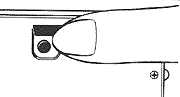 |
1. When the film is at its end, the advance lever no longer operates smoothly, check the frame counter (4) display. If the frame counter shows that the all frames of the loaded film have been exposed, the film then needs to be rewound. |
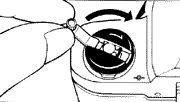 | |
Note: If the film reaches the end of the roll during film advance, the film advance lever will lock. Rewind the entire roll, then complete the movement of the film advance lever and put it back into place.
"B" (bulb) Setting
1. With the shutter speed dial (1) set at "B" position, the shutter will remain open for as long as the shutter release button (2) is pressed.
|
|
2. This setting is useful when an exposure longer than one second is required, such as in landscape photography at night Or it can be used for the special effect photography by employing the flash test button together with very low light conditions. 3. Be sure to use a tripod and/or cable release when using this long time shuner speed setting. |
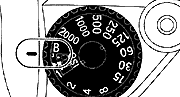
Note: It is recommend that you remove the Batteries from the camera at this setting to avoid wasting the baneries.
Self-Timer
1. Wind the film advance lever (3) and fully turn down the self-timer lever (7) counterclockwise. Now the self-timer is ready to use.
2. Press the shutter release button (2) and the self-timer operates to release the shutter in approximately 10 seconds later.
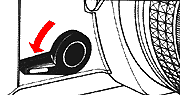 |
3. Once the self-timer becomes ready it is impossible to cancel it manually. So operate it only when needed. |
Flash Photography
1. Connect the flash unit in the Accessory-shoe (9).
2. Set the shutter speed dial (1) at 1/125 second or lower.
3. When using the automatic flash unit, set the aperture to the f-stop specified in the instruction manual of the flash unit.
4. When using the manual flash unit, use the f-stop value obtained by the formula shown below:
Guide Number divided by f-stop = Distance
 |
Note: Nikon claimed flash units not designed for use with Nikon cameras may provide incorrect exposure and/or equipment damage.When using any other flash other than a Nikon product and inserting it into the Accessory-shoe, please do not touch the contact. If you touch the contact, you may be subject to a shock. When using a bracket type flash and connecting it to the contact, please use it without removing the black plastic plate covering the Accessory-shoe. If you touch the Accessory-shoe without the plate, you may subject to a shock. |
Depth-of-Field Preview | More info on Depth of Field |
In the Viewfinder you can visually observe the depth-of-field provided by the selected F-stop.
1. Adjust the Lens Aperture to the desired F-stop. Press the Preview Button. 2. Observe the results of increased sharpness on the (darkened) image in the Viewfinder.
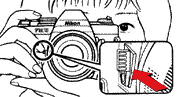 |
* As it will cause the camera to malfunction, please refrain from pushing the shutter release button or winding the film while holding down the preview lever. |
Eyepiece Correction Lenses
The viewfinder eyepiece has a built-in -1 correction (suitable for most normal vision). If your vision requires correction and an eyepiece correction lens is fitted, you do not have to wear eye-glasses when taking pictures. Slip the lens in the groove in the finder eyepiece.
Eyepiece correction lenses are available in 9 types:
-5, -4, -3, -2, 0, +0.5, +1, +2, +3 (Diopters) Note: Some forms of astigmatism etc. may make dioptric eyepiece correction impossible. Please check with your vision specialist for a recommendation based on your prescription.
(More info: Nikon SB-1 to SB-21 Speedlight/Flash Units)
Infrared Photography
|
|
|
1. The dot marks printed in yellow and green are the infrared distance indicators. The green mark with a red line is for 35 mm (wide) and the yellow mark with a red line for 70 mm (telephoto). They are used for reading the distance scale in infrared photography using infrared film and filters. | |
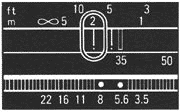
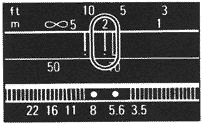
Mount the Lens onto the Camera
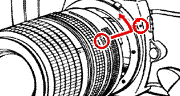
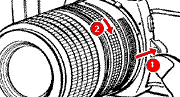
To attach: Position the lens in the camera's bayonet mount so that the mounting indexes on lens and camera body are aligned. Taking care not to press the lens release button (1), twist lens counterclockwise (2) until it locks into place.
To remove: Push the lens release button (1) and turn the lens mounting ring clockwise until the lens comes off.
Note: When changing lenses with film loaded in the camera, be careful not to expose the mirror box to direct sunlight. If the tripod has a large head, contact between the lens barrel and the head may make it impossible to turn the lens aperture ring. In this case, use the special tripod adapter supplied with the camera between the tripod head and the camera body.
General Tips on Camera Care
Although the FM10 is a tough and durable camera, bear in mind that is a precision optical instrument, and that careless or rough handling may damage it. Observe the following tips, and the FM10 will always work as perfectly as the day you bought it
i Do not touch the shutter curtains.
i Clean metallic parts with a blower-type brush or with a dry, soft cloth.
i Generally, the camera does not need lubrication.
i If the camera body is exposed to rain or mist, wipe moisture gently with a soft cloth and dry the camera After using the camera near salt water, take care that you wipe it with a cloth moistened with pure water to remove possible traces of salt.
i If the inside of the camera body accidentally gets wet, its internal precision parts may get rusty. Take the camera right away to the nearest authorized Nikon dealer for a checkup which may require repair payment
i When not using the camera for a long time, tahe out the batteries and store the camera away from high temperature, high humidity, naphthaline, or camphor.
i Clean glass surfaces such as the lens or the finder eyepiece with a blower-type brush; avoid using lens tissue as much as possible. Gently wipe dirt smudges or fingerprints with soft cotton moistened with a small amount of absolute alcohol, using a spiral motion from center to periphery. Make sure you leave no wiping traces.
Caution: Please note that the use of a spray-gun type blower to clean the lens may cause possible damage to the glass (especially when ED glass is used for the front lens e/ement), by suddenly lowering the temperature on the lens sufface. To avoid damage, hold the blower upright, keep its nozzle more than 30 cm away from the lens surface and move the nozzle around so that the stream of air is not concentrated in one spot
i Before using the camera, it is a good practice to check it thoroughly first
i In a humid environment, it is best to- store the camera in a vinyl bag with a desiccant to keep away dust, moisture and salt
i Note that storing leatherette cases in a vinyl bag may cause the leather to deteriorate, so exercise due care.


